 Escape RoomsThe games
Guide
Escape room online: what it is and how to choose one
You don't need a booking, a team or a building to play an escape room online. You need a screen, a bit of patience and an eye for small things. This guide explains the different kinds, how to pick one that suits you, and how to get through your first room.
What is an online escape room? An online escape room is a puzzle game you play on a screen instead of in a building. You are shut in a place and get out by finding clues, working out what they mean and using them on locks, machines and doors. Most run in a web browser; others are apps, downloads or hosted video calls.
- Where online escape rooms come from
- The kinds of online escape rooms
- Where our rooms fit
- How to choose one
- Tips for your first room
- Questions
Where online escape rooms come from
The screen came first. The escape room video game grew out of free browser games made in Adobe Flash, and a Japanese game called Crimson Room (2004, by Toshimitsu Takagi) spread the idea widely online. The real rooms you book in a city came later and, as Wikipedia's escape room article puts it, are inspired by those games.
So when you play an escape room online, you are closer to the original than you might think. The idea is the same in every version: a closed space, a way out, and everything you need hidden in plain sight.
The kinds of online escape rooms
"Online escape room" covers quite different games. Knowing which kind you are looking at saves you from booking a team event when you wanted ten quiet minutes, or the other way round.
2D point-and-click rooms in the browser
The classic form. You see a room as a set of still pictures, click to turn and to zoom in, and collect items in an inventory. Free game portals carry hundreds of them. They are quick to start and often short, and the quality ranges from lovely to rough.
3D rooms in the browser
Here the room is a real 3D space. You walk around it, look up and down, and step up to objects to see them from the angle you choose. It feels closer to standing in a room, and clues can hide in where things are, not only in what they show. It asks a bit more of your device, though any recent phone or computer copes.
Live-hosted rooms over video
A game master runs the room for a group on a video call. Often there is a person in a real room with a camera who moves and opens things on your team's say. These suit birthdays and work socials. They are booked for a time slot and priced per group, and they need everyone online at once.
Phone apps
Escape games from the App Store or Google Play. Many are free to start, with hints or later chapters to buy. You install them first, but they work well on a small touch screen.
Downloadable PC games
Full games for a computer. Escape Simulator on Steam, for example, is a first-person game you can play solo or in online co-op, with a level editor for making your own rooms. Expect the richest rooms here, and a download and a purchase first.
Printable kits
Not on a screen at all once you've bought them: you print the puzzles and play at home around a table. Good for parties with children, and for anyone who likes paper.
| Kind | How you play | Alone or together | Install |
|---|---|---|---|
| 2D point-and-click | Click through still pictures | Usually alone | None, browser |
| 3D in the browser | Walk round a 3D room, look up close | Usually alone | None, browser |
| Live-hosted | A game master on a video call | A group, booked | A video app |
| Phone app | Tap through on a touch screen | Usually alone | App store |
| PC download | First-person game on a computer | Alone or online co-op | Download |
| Printable kit | Paper puzzles at a table | A group at home | A printer |
Where our rooms fit
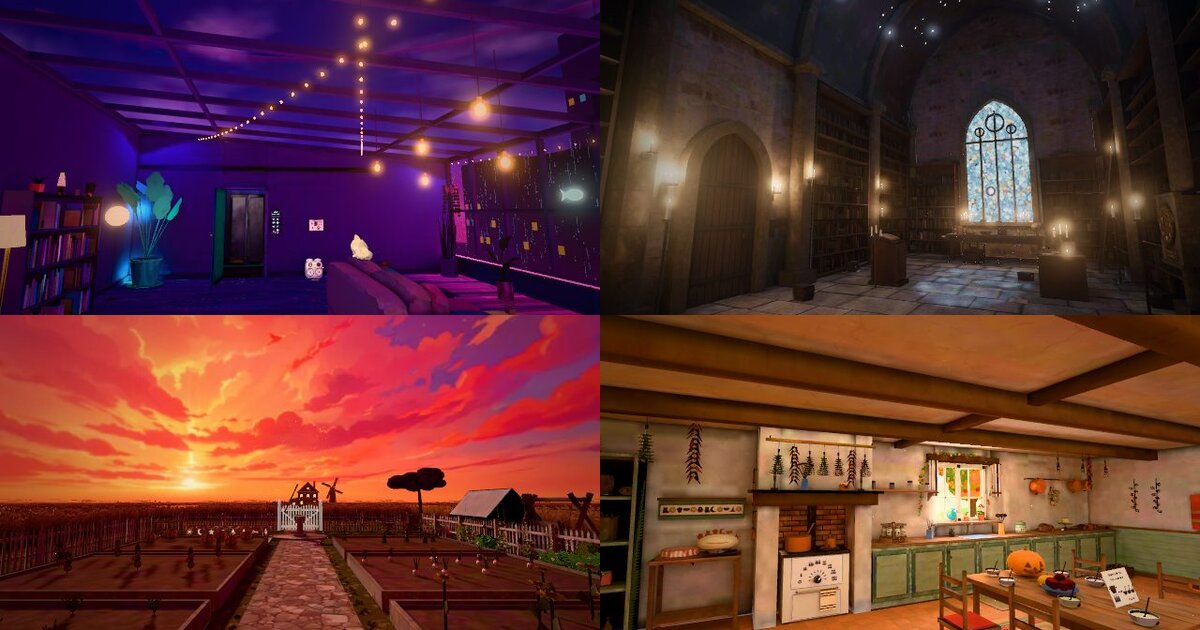
Ours are the second kind: hand-built 3D rooms you play in the browser, on a phone or a computer, with nothing to install. There are four games, each with five rooms and a hidden room, and each with its own world:
- The Midnight Game at Neon Heights (neon night): You were only cat-sitting. At midnight every door in the tower locks, and the TV switches itself on: THE MIDNIGHT GAME HAS BEGUN.
- Wrenhallow (dark academia): You wake on the cold floor of a candlelit library, with no idea how you got there. Old books, brass locks, and a manor that doesn't want to let you go.
- The House at the End of the Path (dreamy sunset): You wake on a path through the corn at sunset. Far ahead, a farmhouse has its lights on, as if someone is expecting you.
- Grandma Fen's Cottage (cosy cottage): A cheeky bird has stolen Grandma Fen's keys, and her slightly magic cottage won't open a door without them. Find all five before her Halloween party.
You walk around each room, tap anything to look at it up close, and work its locks and machines by tapping the parts themselves. Every clue you need is in the room. Each room also plays out on Instagram, one Reel at a time: people comment what to try next, and the best idea is tried in the next Reel. That part is free to follow and join.
You can look inside every game for free: walk around the room that's open now and look at every clue up close. A whole game costs €2.99 ($2.99 in the US) and all four cost €5.99, once, with no subscription.
How to choose an online escape room
Five questions sort out almost every choice.
- Alone or with others? Playing alone, pick a browser game, an app or a single-player download, and take your time. With a group in different places, a hosted video room or an online co-op game works better. With a group on one sofa, one screen and one person tapping is often the most fun. Our guide to solo escape rooms goes into playing alone.
- Free or paid? Free rooms are a good way to see if you like the genre. Paid ones usually give you longer, more connected rooms and a story that runs through them. Many paid games, ours included, let you look around first.
- Phone or computer? Check that the game names your device. Browser rooms are the easiest on phones, since there is nothing to install; see playing an escape room on your phone.
- How hard? Look for a game that starts gently and has hints. A room that gives no help at all can stop being fun after twenty minutes of staring at the same wall.
- How long? A portal game may last minutes; a full game of several rooms is an evening or more, played in sittings. If you can stop and come back later, length matters less.
Want names to compare? Our list of the best online escape rooms puts several side by side, other makers' games included.
Tips for your first escape room online
- Look at everything up close. On a screen it's easy to glance at a shelf and move on. Open every object. Words on a label, a scratch on a dial or a picture on a tile are the usual places for a clue.
- Keep notes. A pen and paper, or a screenshot. Write down every number, symbol, colour and odd word you see, even before you know what it's for.
- Count things. How many keys, wheels or slots does the lock have? That tells you how long the answer is and what kind it is: digits, pictures or letters.
- Combine two clues. A good room rarely hands you the answer in one place. One thing tells you what to look for, and another, somewhere else, tells you where or in what order.
- Notice what changed. When something opens or moves, look around again. New things may have appeared, and old things may now mean something.
- Take a hint before you get bored. Hints are part of the game. A small nudge keeps the fun going and still leaves you the moment when it clicks.
Questions
What is an online escape room?
It is a puzzle game where you are locked in a place on screen and get out by finding clues and using them on locks, machines and doors. Some are drawn scenes you click through, some are 3D rooms you walk around, and some are hosted live over a video call.
Can I play an escape room online for free?
Yes. Game portals carry many free 2D escape games. Here you can look inside each of our games, walking around the room that's open now, and join their Instagram game, both for free. Playing the rooms on your own is part of the paid games.
Can I play an online escape room alone?
Most browser and app escape rooms are made for one player, so yes. Hosted video rooms and some downloadable games are built for groups. Our rooms are played solo in the browser, at your own pace, and together on Instagram, where comments decide the next move.
How long does an online escape room take?
It depends on the kind. A small portal game can take a few minutes, a hosted video room usually runs for a set slot, and a full game of several rooms takes longer. For our games we estimate one to three hours for all the rooms of one game; we have not timed it widely yet.
Do I need to download anything?
Not for browser escape rooms: they open in Safari, Chrome, Firefox or Edge on a phone or computer. Apps need an install from the app store, and PC games such as Escape Simulator need a download. Ours run in the browser with nothing to install.
Are online escape rooms hard?
Most start gently and get harder room by room. A good one gives you every clue you need inside the room, so being stuck means something is still unexplored. Hints help: ours offer one after ten minutes without progress, and each hint is a small nudge, never the whole answer.
Where to go next
Ready to try one? Look inside a room for free, browse the four games and their prices, or read on: solo escape rooms, escape rooms on your phone and the best online escape rooms.